


While cloud environments have many advantages, they can also add a layer of complexity to your disaster recovery (DR) operations. That’s why we created this book, to equip you with the tools and expertise you need to navigate the complexities of cloud DR and empower you to recover your important business services efficiently and effectively.
We’ve partnered with AWS to forge robust cloud DR plans and significantly reduce our customers’ cloud DR execution time by 50% by codifying and orchestrating manual and automated cloud DR tasks. Reading this book will help you gain knowledge in three key areas:
- Building a complete arsenal of recovery runbooks
Cloud DR isn’t just about backups. Imagine a clear, automated game plan – your recovery runbook – guiding your IT and business teams through disaster. This book helps you identify your recovery maturity capability and best practices when creating an automated disaster recovery plan. Ditch the siloed approach and restore systems efficiently, minimizing downtime and business impact.
- Testing, adapting and automating to strengthen your recovery posture
To ensure robust recovery, you must regularly test your cloud DR plan – it’s a living process, not a dusty static document. Being able to identify and address weaknesses in your plan before you need to use it in a real-world recovery scenario ensures that your business will be able to minimize downtime after an outage. Cloud DR is a continuous process and by regularly rehearsing, improving and automating, your cloud teams and infrastructure are ready to face any unforeseen event.
- Having the right technology stack
Better understand what AWS provides for recovery and how integrating your full cloud disaster recovery technology stack with automated runbooks will lead to faster, more reliable cloud recovery.
Understanding cloud disaster recovery
What is cloud disaster recovery?
At its core, disaster recovery (DR) refers to the strategies, processes, and tools used to recover critical IT infrastructure and data after a disruptive event. This event could be anything from a natural disaster like a flood or fire in your data center to a cyber attack or even a hardware failure. The goal of DR is to minimize downtime and data loss, ensuring your business operations can resume swiftly.
Cloud DR shares the same objective as traditional, on-premises IT DR, that is, safeguarding your critical applications and data from disruptions and ensuring their swift recovery. Both involve strategies for:
- Backup and replicate data
Regularly creating copies of data and storing them in a separate location, either on-premises or in the cloud.
- Failover mechanisms
Establishing procedures to seamlessly switch to a backup environment in case of a disaster, minimizing downtime
- Testing and recovery procedures
Regularly testing DR plans and refining recovery procedures to ensure effectiveness.
What is the difference between traditional IT DR and cloud DR?
The answer lies in the “where.” Traditional IT DR focuses on recovering from disruptions within your on-premises infrastructure. Cloud DR, on the other hand, leverages the inherent benefits of cloud computing for disaster recovery purposes.
The benefits of cloud disaster recovery
- Scalability and elasticity
Cloud resources are readily scalable, allowing you to easily adjust storage and compute power based on your recovery needs.
- Reduced costs
Eliminate the need to invest in and maintain a separate disaster recovery infrastructure. Pay only for the resources you use during a recovery event.
- Geographic redundancy
Cloud providers offer geographically dispersed data centers, enhancing protection against regional disasters like natural disasters or power outages.
While cloud DR leverages the cloud’s unique capabilities, it doesn’t fundamentally alter core DR principles. You’ll still need to define your RTOs (Recovery Time Objectives) and RPOs (Recovery Point Objectives) to determine acceptable downtime and data loss during a disaster. Additionally, testing and refining your DR plan remains crucial for success, regardless of the environment.
Here’s the takeaway: Cloud DR isn’t a completely new concept, but rather it is a traditional IT DR strat - egy enhanced by the power and flexibility of cloud computing. It’s a familiar concept so let’s explore it in more detail.
Application architectures for the cloud and on-premises
In the realm of cloud disaster recovery, orchestrating and designing disaster recovery processes for applications on the cloud or in a hybrid deployment is crucial. The goal is to address this application complexity and to understand how this fits into the flow of disaster recovery strategies.
Large enterprises with complex environments understand that the need to orchestrate and document disaster recovery processes on the cloud or in a hybrid application world is paramount. Despite the transition to the cloud, applications still require the same fundamental building blocks. These include compute, storage, network, database, identity, and security. The key difference lies in how these layers are abstracted and managed.
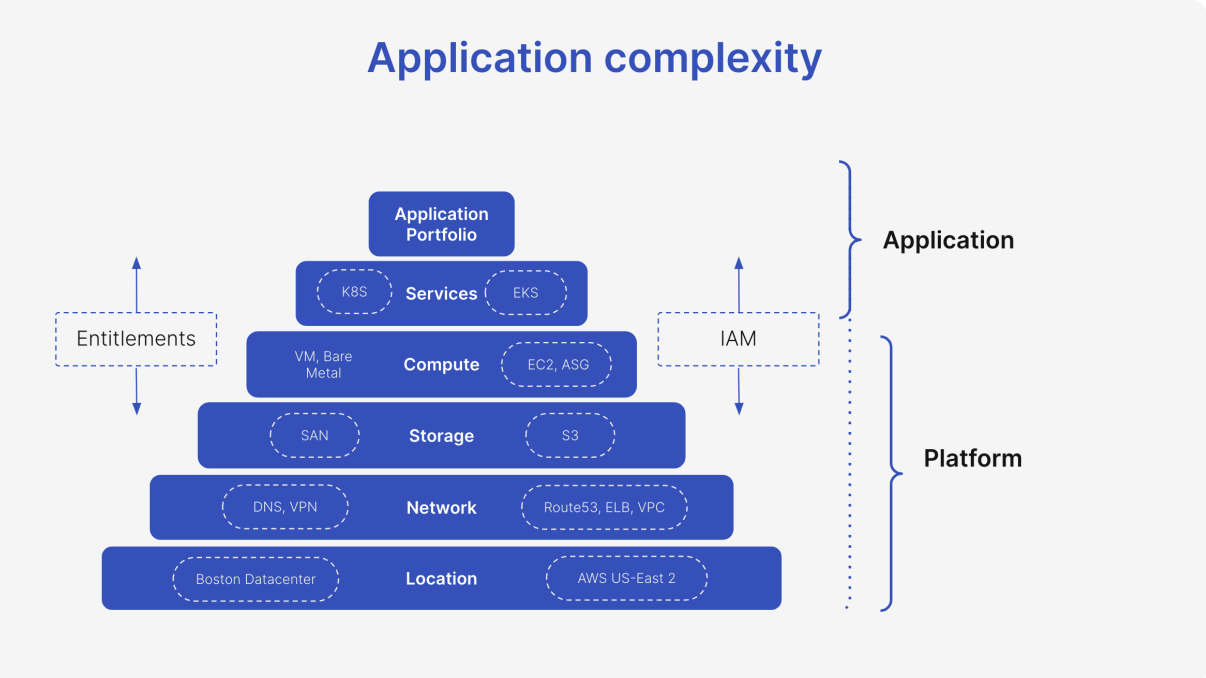
In on-premises environments, the abstraction of these layers is more hardwired into the physical infrastructure and established ways of working. Server hardware dictates the infrastructure, and established workflows – often involving separate build and run teams – revolve around platforms like VMware, Windows Server, or mainframes. The move to cloud-hosted applications represents a learning curve for migration teams. The application itself becomes the focal point, operating closer to the velocity of software development rather than being limited by physical hardware and manual processes.
Institutions embarking on this transition must consider the distinction of the application complexity layers and how cloud environments affect an enterprises ability to recover.
Key considerations for a cloud disaster recovery plan
- Data plane vs. control plane: Differentiate between the data processing layer (data plane) and the management layer (control plane). Understanding this separation is crucial for effective DR planning.
- Vendor availability zones: Consider the availability zones offered by your cloud provider. These zones provide geographically dispersed locations to enhance fault tolerance.
- Operational needs: Factor in ongoing operational requirements like monitoring and logging. These functions remain essential for maintaining application health in the cloud.
- Cross-region failover: For critical applications, consider implementing cross-region failover strategies. This ensures redundancy across geographically separate cloud regions.
Regardless of the underlying hosting technology, the core need for application availability and resilience remains constant. Cloud DR plans help organizations achieve this objective by providing a structured framework for managing application dependencies and ensuring seamless recovery in the event of an outage.
Cloud disaster recovery challenges
While cloud DR offers a plethora of benefits, it’s not without its challenges. Here’s a closer look at some key hurdles to consider:
- The complexity of cloud environments
Cloud environments can be complex, with various services and configurations to manage. This complexity can make it challenging to set up and test your DR plan effectively. Understanding your cloud provider’s DR functionalities and integrating them seamlessly with your existing infrastructure requires careful planning.
- Security concerns
Restoring data and applications from on-premises to cloud platforms raises security concerns such as adherence to corporate security policies. It’s crucial to carefully evaluate the cloud provider’s security measures and ensure they align with your organization’s data security policies and compliance requirements. Additionally, managing access controls and data encryption across the cloud environment is paramount.
- Network dependency
Cloud DR heavily relies on a stable network connection. Disruptions to your internet connectivity, either at your on-premises location or within the cloud provider’s network, can hinder your ability to access and recover critical data during a disaster. Having a robust and reliable network connection is essential for successful cloud DR.
- Cost management
While cloud DR offers a pay-as-you-go model, costs can add up during a prolonged disaster recovery event. Resource usage, such as the storage and compute power required for recovery, can significantly impact your bill. Carefully monitor your cloud resource consumption and implement cost-optimization strategies to avoid unexpected expenses.
- Lack of expertise
Implementing and managing a cloud DR plan may require specific technical expertise in cloud technologies and DR best practices. If your IT team lacks this expertise, you might need to invest in training or consider managed DR services offered by cloud providers.
- Testing and validation
Regularly testing your cloud DR plan is crucial to ensure its effectiveness. However, testing cloud DR scenarios can be more complex compared to on-premises environments. Cloud providers might have specific guidelines or limitations for conducting DR drills within their environment. Ensure you understand these limitations and plan your testing procedures accordingly.
- Compliance considerations
Certain industries have strict data residency and compliance regulations. Cloud DR can make adhering to these regulations more complex, as your data might reside outside your physical location. Carefully evaluate your compliance requirements and choose a cloud provider that offers solutions that meet your specific data residency and regulatory needs.
- Vendor lock-in
Cloud providers offer unique features and functionalities. Relying solely on a single vendor can lock you into their ecosystem, potentially making it difficult and costly to switch providers in the future.
Why cloud disaster recovery plans are important
In today’s world, application downtime translates to lost revenue, productivity, and potentially, customer trust. A cloud DR plan acts as your organization’s safety net, ensuring a swift and smooth recovery from unforeseen disruptions. Whether it’s a cyber attack, a natural disaster, or even a hardware failure, a well-defined cloud DR plan minimizes downtime and safeguards your critical applications and data.
Even if your applications reside on-premises, having a cloud DR plan in place is a wise decision. Traditional disasters like fires, floods, or power outages can cripple your on-premises infrastructure, leading to significant downtime and data loss. A cloud DR plan provides a reliable offsite backup solution. By replicating your on-premises applications and data to the cloud, you ensure a secure and readily available recovery environment. In the event of a disaster, you can quickly fail over to the cloud, minimizing downtime and ensuring business continuity. Furthermore, cloud DR plans offer inherent scalability. Cloud resources can be easily scaled up during a recovery process to meet your specific needs, allowing you to resume operations efficiently.
This level of flexibility and reliability is often difficult to achieve with traditional on-premises DR solutions.
AWS disaster recovery structure and services
The shared responsibility model in AWS
The cloud offers numerous benefits for businesses of all sizes. Scalability, agility, and cost-efficiency are just a few reasons why companies are increasingly migrating their operations to cloud platforms such as AWS. But with this shift comes a crucial question: Who’s responsible for application resilience in the cloud?
This is where the concept of the AWS shared responsibility model comes in. When it comes to DR and overall resiliency in AWS, the responsibility is shared between your organization and AWS. Understanding this model is crucial to ensure your data and applications are properly protected.
The shared responsibility model: A foundation of trust
The core principle of the AWS shared responsibility model is simple: Security and resiliency are a joint effort. AWS takes responsibility for the underlying infrastructure, including hardware, operating software, networking, and physical facilities. Their Service Level Agreements (SLAs) guarantee a certain level of uptime and redundancy for these core components. However, your responsibilities begin at the guest operating system level. This includes patching and updating your applications, managing data backups and versioning, security and building out recovery and regulatory compliance plans.
Shared responsibility: A collaborative approach
The beauty of the shared responsibility model lies in collaboration. AWS provides a robust foundation and you leverage that foundation to design and implement your DR strategy based on your specific needs, RTOs and RPOs. By understanding your responsibilities and leveraging the AWS services and partner resources at your disposal, you can build a comprehensive DR plan that safeguards your applications and data in the cloud.
Fault isolation boundaries: Building resilient applications on AWS
When building applications on the cloud, ensuring they can withstand disruptions is critical. Here’s where AWS fault isolation boundaries come into play. These boundaries, spanning availability zones (AZs), regions, and global services, provide a foundation for designing DR strategies
Zonal boundaries: Protecting against localized outages
Concept: An AZ is a geographically isolated data center within a region. Each region has multiple AZs, connected by highly reliable, low-latency networks.
Benefits for DR: By deploying your resources across multiple AZs within a region, you can achieve high availability (HA). If one AZ experiences an outage, your application can fail over to a healthy AZ, minimizing downtime.
DR use case: Deploying web servers and databases across multiple AZs ensures your application remains accessible even during an AZ outage.
Regional boundaries: Isolating from large-scale disasters
Concept: A region is a large geographical area containing multiple AZs. Regions are completely isolated from each other with independent infrastructure.
Benefits for DR: DR across regions protects your applications from large-scale outages impacting an entire region, like natural disasters. By replicating your data and applications to a different region, you can recover them in case of a regional outage.
DR use case: For critical applications requiring protection from regional disasters, deploy them with resources spread across regions.
Global services: Scalability with geo-redundancy
Concept: Certain AWS services, like Amazon Route 53 domain name system (DNS), are inherently global. Their infrastructure is distributed across multiple regions, offering inherent fault tolerance.
Benefits for DR: Global services inherently offer some level of fault tolerance. Even if a regional outage affects a specific region, the service might remain accessible from other healthy regions.
DR use case: Using a globally-distributed DNS service such as Amazon Route 53 ensures your application remains reachable even during regional outages.
Choosing the right boundaries for your DR strategy
The optimal fault isolation boundaries for your DR strategy depend on your specific needs. Consider factors like:
- RTOs: How quickly do you need your application to recover after a disaster?
- RPOs: How much data loss can you tolerate?
- Disaster likelihood: How probable is a large-scale disaster impacting your primary region?
By understanding AWS fault isolation boundaries and your DR requirements, you can design a robust and cost-effective strategy to keep your applications running smoothly, even during unforeseen events.
Key AWS services for AWS Resilience Hub a resilient cloud
As described with the AWS “shared responsibility model” above, DR strategies are the responsibility of the customer. Any downtime can cripple businesses, and ensuring swift recovery is paramount. To help support their customers, AWS offers a robust suite of services to empower you to build a comprrhensive DR strategy. Let’s explore some of AWS’ key services:
AWS Elastic Disaster Recovery Service (DRS)
Streamlined replication and recovery
Function: DRS works to replicate your applications, whether on-premises, in another cloud, or within AWS across regions. This continuous replication keeps your data secure and minimizes compute resource usage for cost-effectiveness.
Benefits: DRS offers faster recovery times through continuous replication, minimizing downtime during outages. DRS also simplifies DR management with a centralized con - sole and offers broad application support
Limitations: While offering point-in-time recovery, granular file-level or application-aware recovery is not directly supported. Additionally, DRS lacks the scale and regulatory audit logging to handle hundreds or thousands of application recoveries
AWS Resilience Hub
Centralized guidance and assessments
Function: Think of Resilience Hub as your DR com - mand center. It offers a central location to define, assess, and track the resiliency of your applications. This proactive approach helps identify weaknesses and guides you towards using the right AWS services for your DR needs.
Benefits: Resilience Hub promotes proactive DR planning by recommending services like DRS, Fault Injection Simulator (FIS), and Route 53 Application Recovery Controller (ARC) based on your application’s needs. It also provides visibility into your application’s resiliency score, helping you measure your DR preparedness.
Limitations: Resilience Hub acts as a central hub and doesn’t directly handle replication or recovery tasks. It relies on other AWS services for execution.
AWS Fault Injection Service(FIS)
Function: FIS injects controlled failures into your applications, simulating real-world disruptions. This allows you to test your DR plan’s effectiveness in a safe, non-disruptive environment. By observing how your application behaves under simulated stress, you can identify and rectify weaknesses.
Benefits: FIS offers insights into your application’s resilience and uncovers potential issues before a real disaster strikes. FIS helps to test your DR plan and instill confidence in its ability to handle disruptions.
Limitations: FIS focuses on testing application behavior and doesn’t directly replicate data or perform live disaster recovery actions.
Amazon Route 53 Application Recovery Controller (ARC)
Traffic routing continuity
Function: Route 53 ARC plays a crucial role in directing traffic away from a failing region during a disaster. It seamlessly routes traffic to your healthy recovery environment in a different region, minimizing application downtime for your users.
Benefits: Route 53 ARC ensures business continuity by maintaining application availability even during regional outages. It simplifies traffic management during failover scenarios and streamlines recovery processes.
Limitations: Route 53 ARC focuses on traffic routing and works best when used in conjunction with other DR services like DRS for data replication and recovery.
Amazon Lambda
A serverless ally
Function: Lambda excels at automating specific tasks triggered by events. In a DR scenario, Lambda functions can be invoked upon detecting an outage, initiating predefined actions like data backups, scaling resources in the recovery region, or triggering notifications.
Benefits: Lambda’s serverless architecture minimizes manual intervention, freeing up IT staff to focus on higher-level DR tasks. In addition, Lambda can automatically scale to meet processing demands during a cloud DR event, ensuring resources are available when needed.
Limitations: Lambda functions are tied to the specific AWS region they’re deployed in. If a disaster affects the entire region, your Lambda functions will be unavailable. Mitigating this requires a multi-region DR strategy. Also, Lambda functions are designed for short-lived tasks, requiring complex application logic to use alternative solutions.
Building a cohesive DR strategy- An example approach
The beauty of achieving comprehensive cloud DR lies in leveraging these AWS services together.
- Utilize Resilience Hub to assess your application’s resiliency and identify DR needs.
- Implement DRS for continuous replication of your critical applications.
- Employ FIS to test your DR plan and application behavior under simulated disruptions.
- Leverage Route 53 ARC to manage traffic routing during a disaster and ensure application availability.
- Use Lambda to automate manual, repetitive tasks
Furthermore, to achieve a centralized and scalable DR methodology across all of your application deployments, you will need Cutover’s Collaborative Automation SaaS platform. Cutover provides you with dynamic, automated runbooks for complex recoveries, dashboards for progress and stakeholder information, integrated communications and complete immutable audit logs for regulatory compliance.
Remember, DR is an ongoing process and you need to regularly test, refine, and adapt your strategy as your cloud environment evolves. By harnessing the power of these AWS and Cutover services, you can build a robust DR arsenal that safeguards your applications and data in the face of any disruption
Planning your AWS cloud disaster recovery environment
Identifying critical applications and dependencies
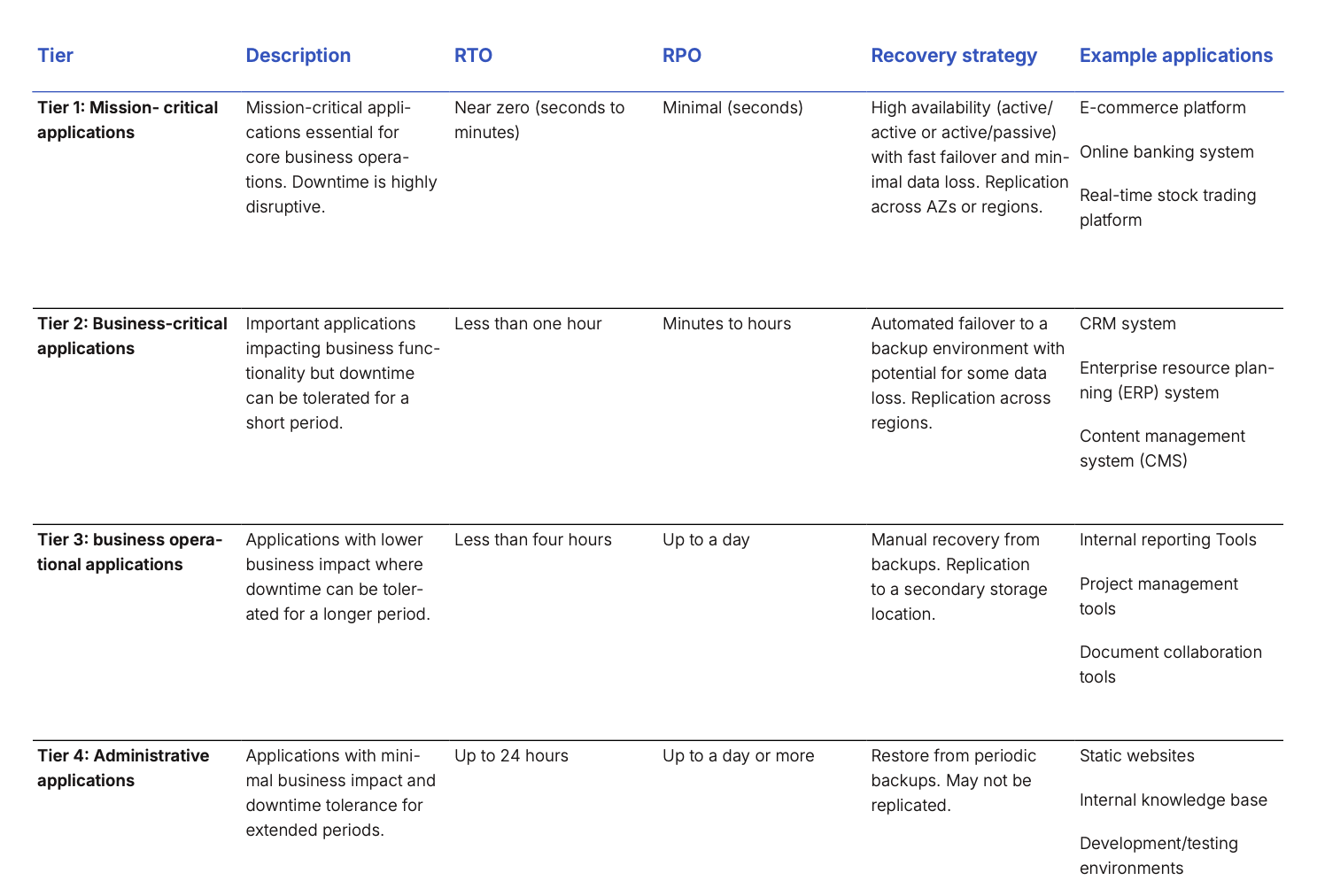
Before you can plan your recovery for cloud applications you must first document which applications you have and rate them by their level of criticality to the business. How critical an application is will impact how highly they are prioritized for recovery and how long an acceptable recovery time is for them. There are generally four criticality tiers that will impact how you manage the recovery of your cloud applications:
Tier 1: Mission critical
Requires continuous availability. Breaks in service are intolerable and immediately and significantly damaging. Availability required at almost any price. These applications generate revenue, are used directly by external customers, and underpin several other applications. Unavailability impacts are severe with direct impact on public or national safety, cause immediate damage to reputation, damage revenue generation, and incur regulatory penalties. Target availability uptime is 99.99% or better.
Tier 2: Business critical
Business critical applications require continuous availability but short outages are not catastrophic. Availability is required for effective business operation. These applications indirectly affect revenue generation, support essential activities for effective business operation, and are depended on across the organization. Unavailability impacts are significant as they can have an indirect impact on public safety, prevent the collection of revenue, have a significant impact on customer service, or significantly disrupt operations. Target availability uptime is 99.9%.
Tier 3: Business operational
These applications contribute to efficient business operation but are out of the direct line of service to customers. Examples include applications that support operational activities, are mostly used by internal users, and affect the efficiency and cost of operations. Outage impacts are moderate, reducing efficiency and increasing the costs of operations. Target uptime is 99%.
Tier 4: Administrative
These are office productivity tools for business operations and failures do not affect customers. They are used exclusively by internal users and support individual productivity. Unavailability effects are minor, reducing individual performance and productivity and target availability uptime is 90%. Different levels of criticality will require different responses - higher availability solutions will be more expensive to recover, so depending on the tolerance for downtime you will need to adjust your strategy accordingly. Once you have outlined the applications for recovery and their level of criticality, you can hone in on the exact recovery times to set for these applications.
Choosing a cloud disaster recovery strategy
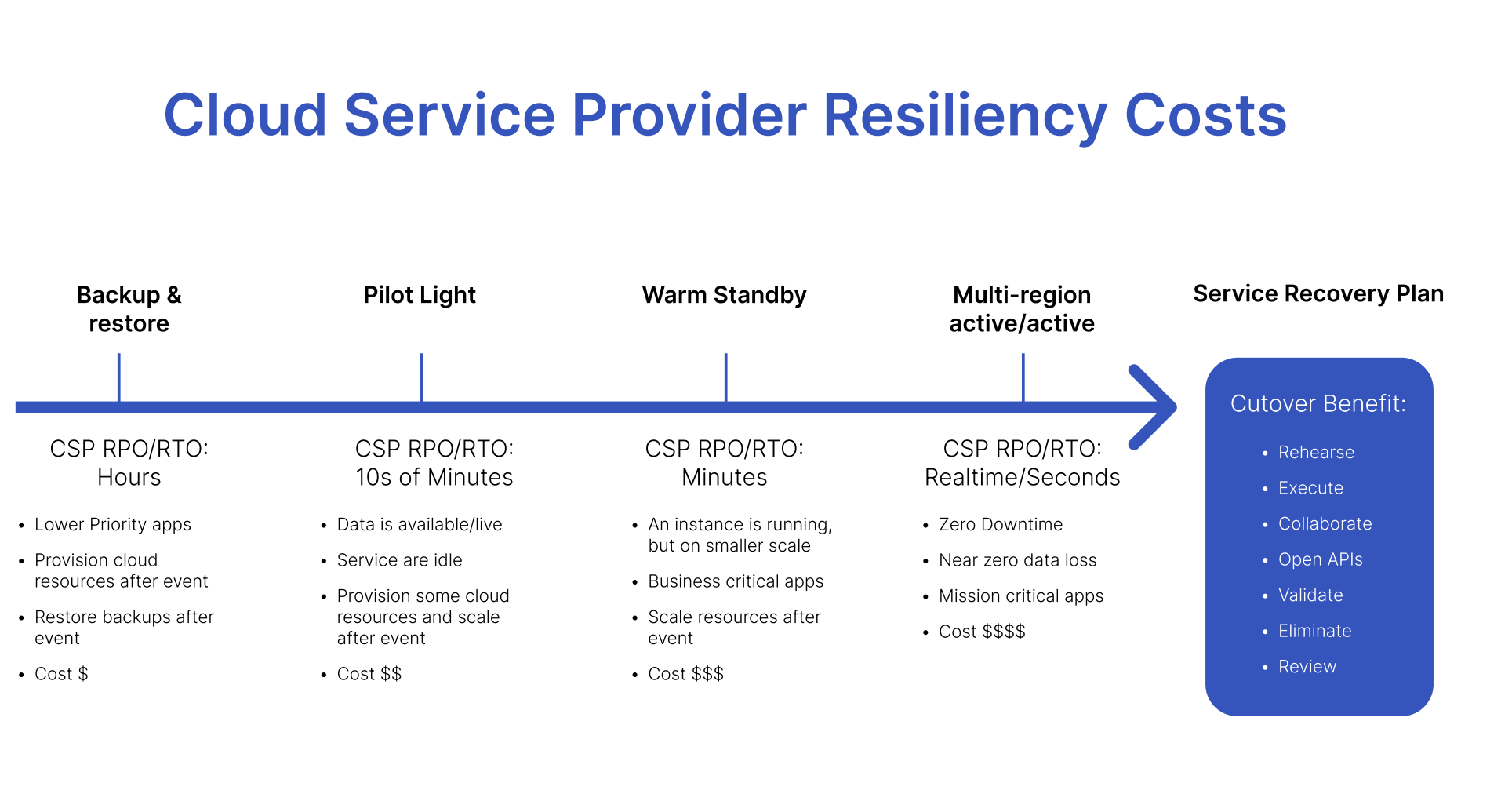
There are four main cloud-based disaster recovery strategies used by organizations and all have different functions, benefits and limitations. Choosing the right one depends on a number of factors, including the criticality of the services being recovered, the RTOs and RPOs associated with them, and your budget.
Backup and restore
Backup and restore is a lower-cost option that can be used for lower-priority applications that have an RPO and RTO measured in hours. This strategy involves provisioning all cloud resources and recovering backups after an outage or other event has occurred.
Pilot light
The pilot light approach replicates data from one region to another and provisions a copy of the core workload infrastructure. The resources required to support data replication and backup, such as databases and object storage, are always on but other elements such as application servers are switched off and only used during testing or a real failover. Unlike the previous approach, the core infrastructure is always available so users can quickly provision a full-scale production environment by switching on and scaling application servers. This approach is best for services that have an RPO and RTO measured in the tens of minutes and is slightly more expensive than backup and restore.
Warm standby
For business-critical applications that have RPOs and RTOs measured in minutes, warm standby involves having services always running on a smaller scale and scaling them up after an event. This approach also makes it easier to perform tests or implement continuous testing to increase confidence in the ability to recover from a disaster.
Multi-site active/active
For mission-critical applications that require zero downtime, multi-site active/ active is the best approach. This involves running the workload simultaneously in multiple regions, so users can access the workload in any region in which it’s deployed. This is the most complex and costly form of cloud disaster recovery but enables near zero downtime.
Why automated runbooks?
Ensuring your applications and data remain resilient in the face of disruptions is no longer optional. Traditional DR plans often involve a tangled mess of spreadsheets, static documents, and frantic communication across teams. With automated runbooks you bring order to the chaos. They are codified playbooks that orchestrate recovery tasks carried out by both people and automation. This reduces human error and streamlines the process, ensuring everyone involved knows exactly what to do and when.
Automated runbooks are more than just fancy checklists. They are a strategic investment that empowers your IT team, streamlines incident response, and, ultimately, keeps your business running smoothly. By embracing automation, you can free your team up to focus on what matters most – innovation and proactive problem-solving.
Benefits of using automated runbooks
Here’s why automated runbooks are essential to any disaster recovery toolbox:
- Reduced downtime and faster recovery: Manual DR processes are often slow and cumbersome. Automated runbooks eliminate human error and execute recovery tasks swiftly, minimizing downtime and ensuring a faster return to normalcy.
- Improved efficiency and reduced costs: Automating repetitive tasks frees up your IT team to focus on more strategic initiatives. Codifying tasks in an automated runbook simplifies DR orchestration, potentially reducing the time and resources needed for DR planning and execution.
- Enhanced consistency and reduced risk: Manual processes are inherently prone to human error. Automated runbooks ensure the consistent and error-free execution of DR steps, reducing the risk of mistakes that could further hinder recovery efforts.
- Streamlined collaboration across teams: Automated runbooks integrate seamlessly with various tools and platforms your teams already use. This fosters better collaboration and communication during a recovery event, ensuring everyone is on the same page.
- Increased visibility and control: A leading edge automated runbook solution will provide clear real-time visibility into the execution of your DR runbooks. This will allow you to monitor progress, identify potential issues, and make informed decisions throughout the recovery process.
- Enhanced scalability: As your IT environment grows, so do recovery challenges. Automated runbooks can be easily scaled to accommodate new systems and processes, ensuring your team remains prepared.
Beyond automation: The human touch
While automation is powerful, it’s not a silver bullet when disaster strikes. There will always be situations requiring human intervention and decision making. Automated runbooks work best when used in conjunction with skilled IT and business operations professionals.
Here’s how the ideal scenario unfolds:
- An incident occurs, triggering the automated runbook.
- The runbook guides the IT operations team through the recovery process, providing clear instructions and decision points.
- The runbook automates repetitive tasks like ticketing and pulling configuration management database (CMDB) information, provisioning new servers or rehydrating data, and keeping stakeholders informed of their upcoming tasks so they are not sitting on endless conference calls waiting for their task to be completed.
- Real-time dashboards keep everyone on track.
- Throughout the recovery, the IT operations team leverages their expertise to analyze the situation, make informed decisions, and potentially take manual actions as needed.
- Immutable audit trails are automatically created for regulatory and compliance purposes.
This collaborative approach between automation and human expertise ensures efficient incident resolution while maintaining the critical role of skilled IT professionals.
How Cutover runbooks work with AWS services for cloud disaster recovery
Example: A cloud disaster recovery scenario
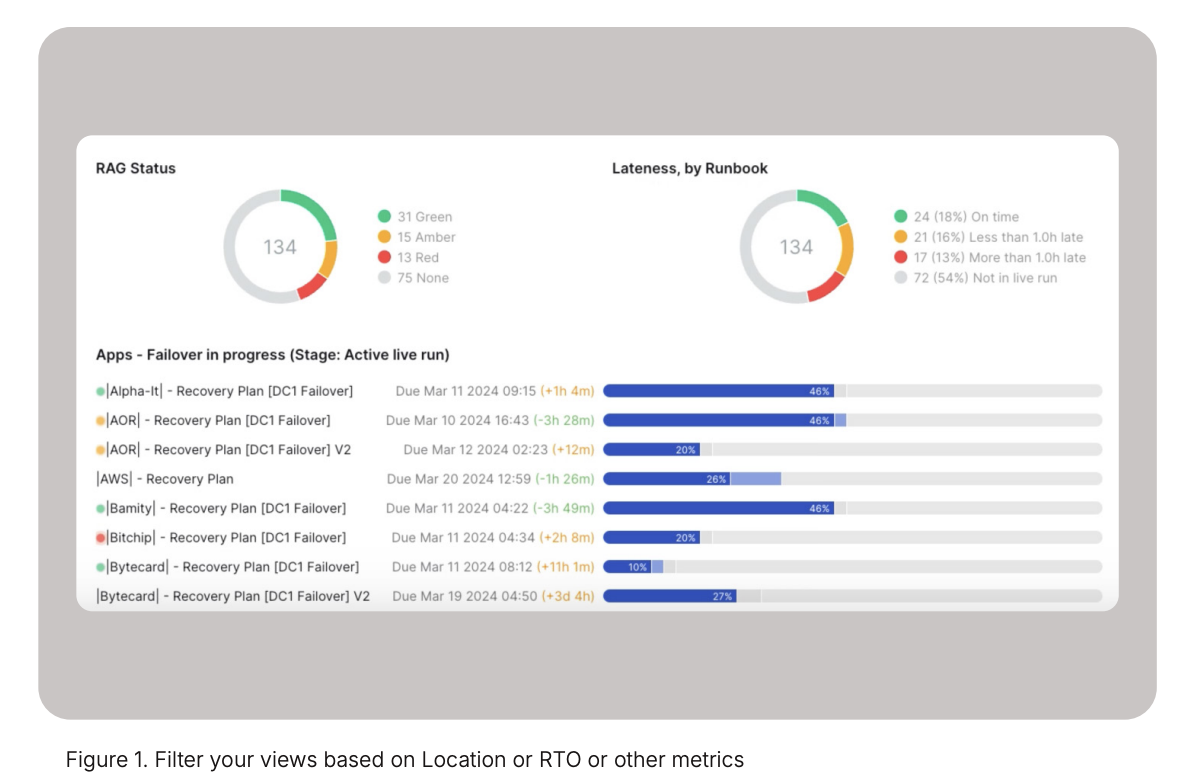
In general, large, complex enterprises run up to 500- 5000 applications. Of all those applications, the top 20-30% are mission or business critical with recovery time objectives ranging from 15 minutes to an hour. In this example, a power failure has occurred knocking out one of the application localities which could be an enterprise data center or an AWS Availability Zone. Based on the predefined business criticality of the applications, there are 134 applications involved in this failover and their current recovery status is in this Cutover view (figure 1).
Recovery orchestration
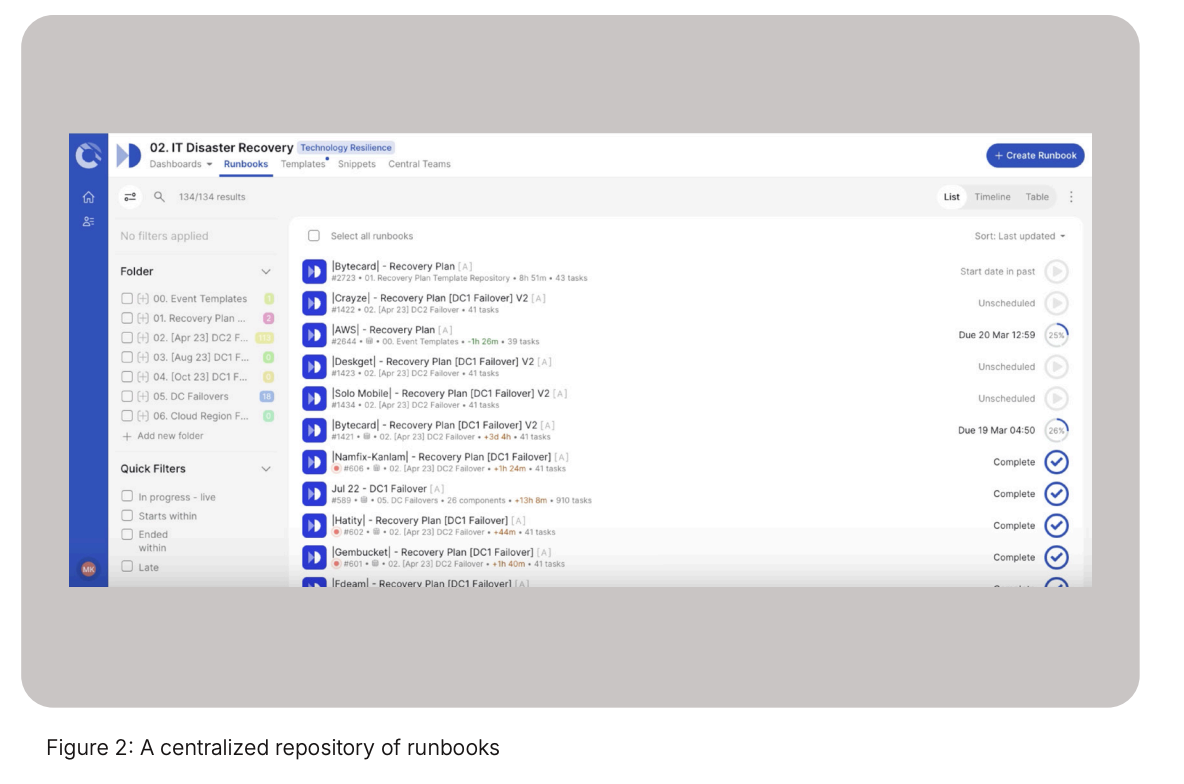
By isolating the most important business services, you know which applications to fail over first from this centralized view in Cutover, regardless of the AWS account it is hosted in. This (figure 2) is the repository of the runbooks built from approved disaster recovery templates. You can see associated CMDB data at the runbook level and the history of executions from the templates that have been defined. Now, let’s look at an example of a single application that is going to use AWS Disaster Recovery Service (DRS) to fail over its data layer.
In the Cutover runbook (figure 3) we know from the application definition that we are going to use AWS DRS to fail over the compute instances.
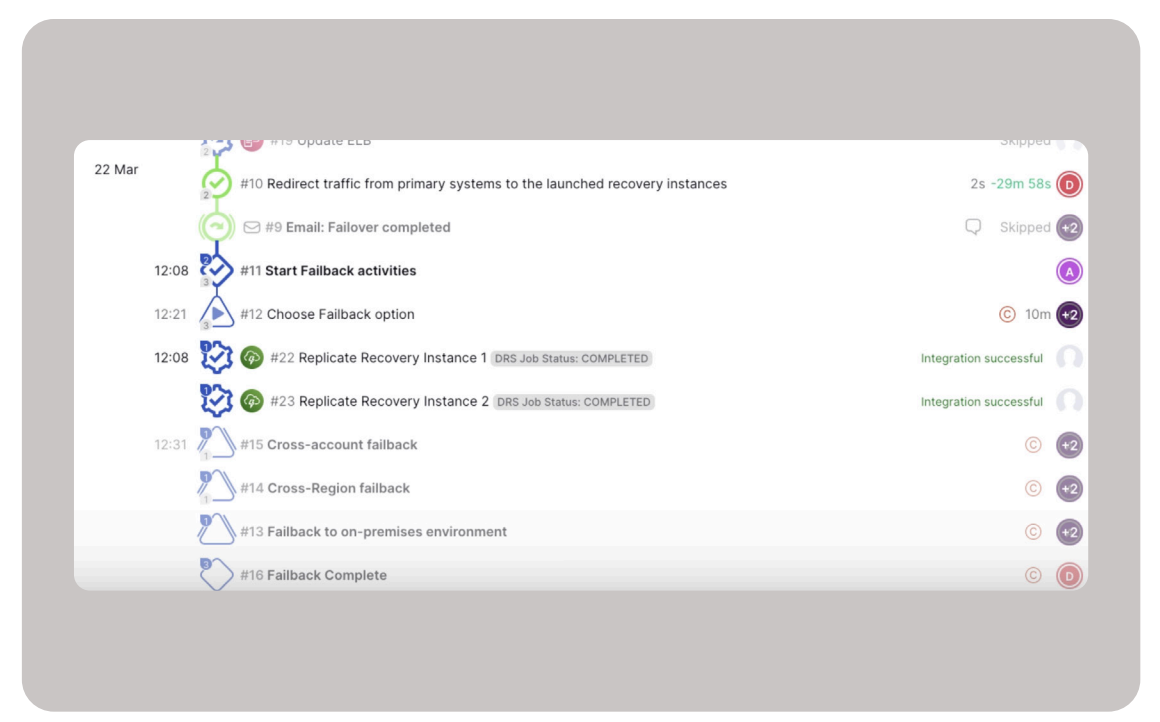
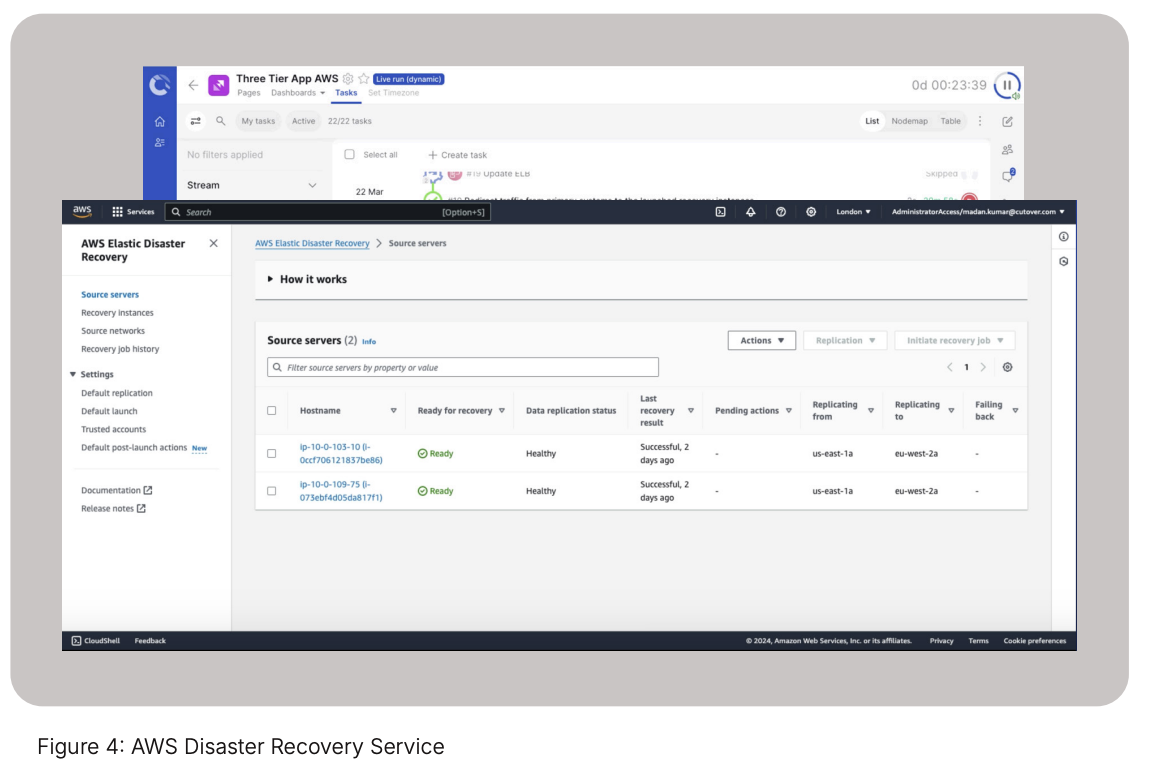
This runbook has been dynamically populated at runtime with real-time data from an application registry or the CMDB by describing the Amazon Elastic Compute Cloud (Amazon EC2) instances to filter on by tags. Cutover can then dynamically build and populate a runbook template based on the data from the app registry or CMDB that includes the AWS DRS server tasks (figure 4).
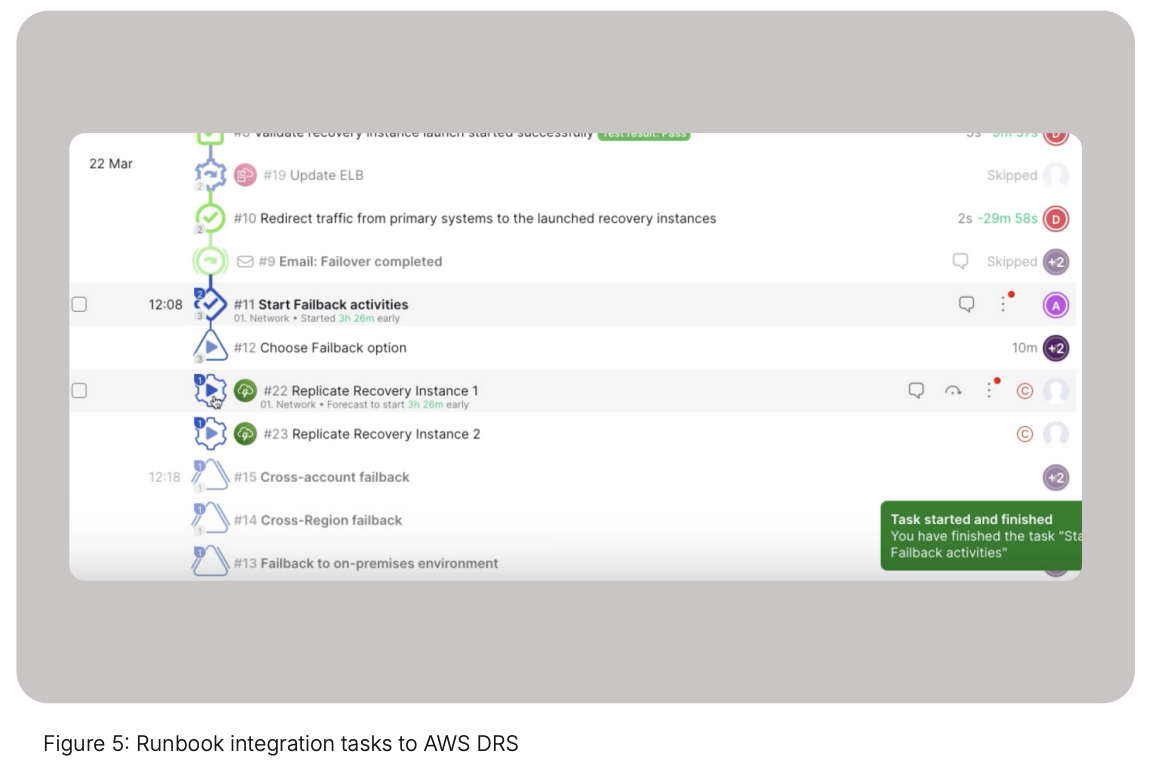
As the runbook (figure 5) executes preliminary tasks, it reaches the point to start the AWS DRS integration and failover. Cutover connects to AWS DRS using the DRS Instance ID, which can be found in the AWS account console. Cutover’s AWS DRS integration polls the status of the recovery and this provides real-time visibility in the Cutover dashboards for all parties who might not have access to the DRS console.
Once the application instance has been recovered to a new availability zone with AWS DRS, you can move onto other recovery tasks in the Cutover runbook such as connecting these instances to the network via an AWS stackset operation.
This simple example showed how to recover a single application across two servers. When operating at enterprise scale this same scenario could involve upwards of thousands of servers across multiple AWS accounts. This is where Cutover’s value comes into play - by minimizing “ClickOps” and providing a central source of execution for cloud recoveries. Cutover provides our customers with orchestration capabilities which, when combined with DRS, make for an easy button to manage recovery across the whole enterprise estate, for testing, invocation and learning. Finally, there is a comprehensive immutable audit trail that captures all actions by users during the execution of the runbook. This is essential to meet certain regulatory and compliance requirements.
So, in summary, this example shows a set of impacted applications being triggered because of a failure. However, Cutover runbooks can also help with testing recovery events while demonstrating regulatory proof.
Could DR testing: Simulating cloud fault scenarios with FIS
Cutover combined with AWS’ Fault Injection Service can validate the recovery architecture for applications to ensure that not only can they meet their required RTO, they can also prove resiliency to regulators.
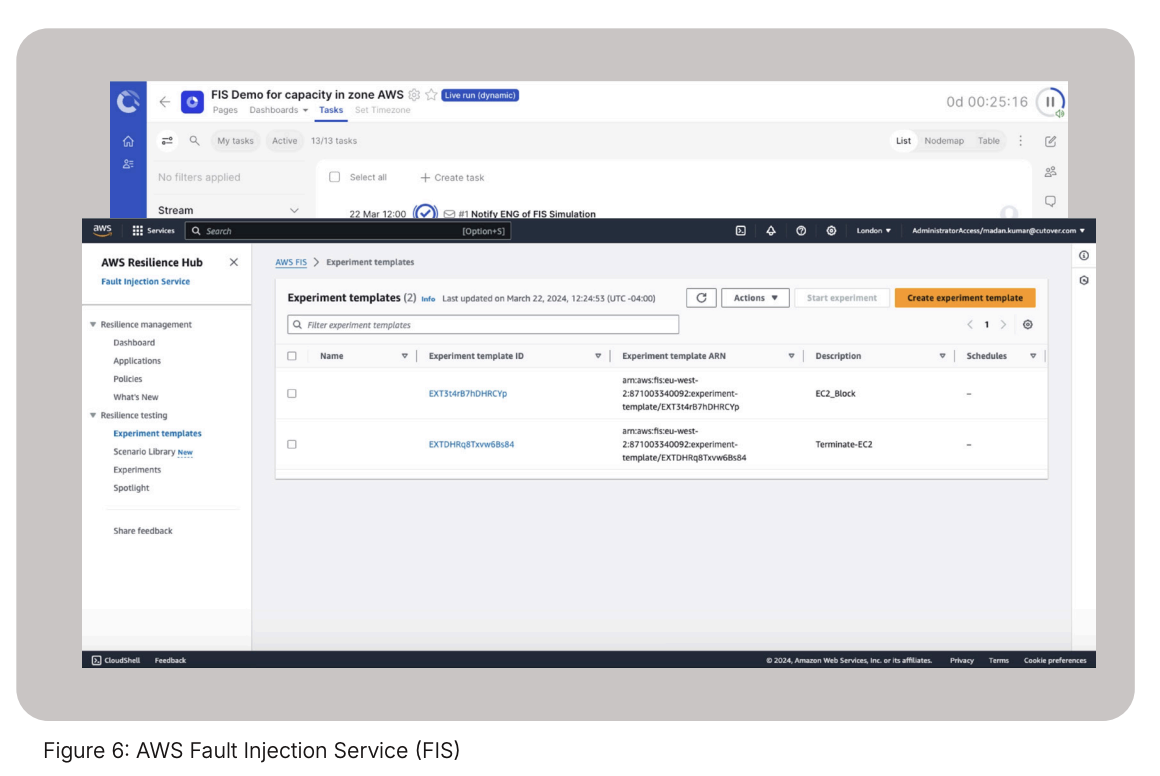
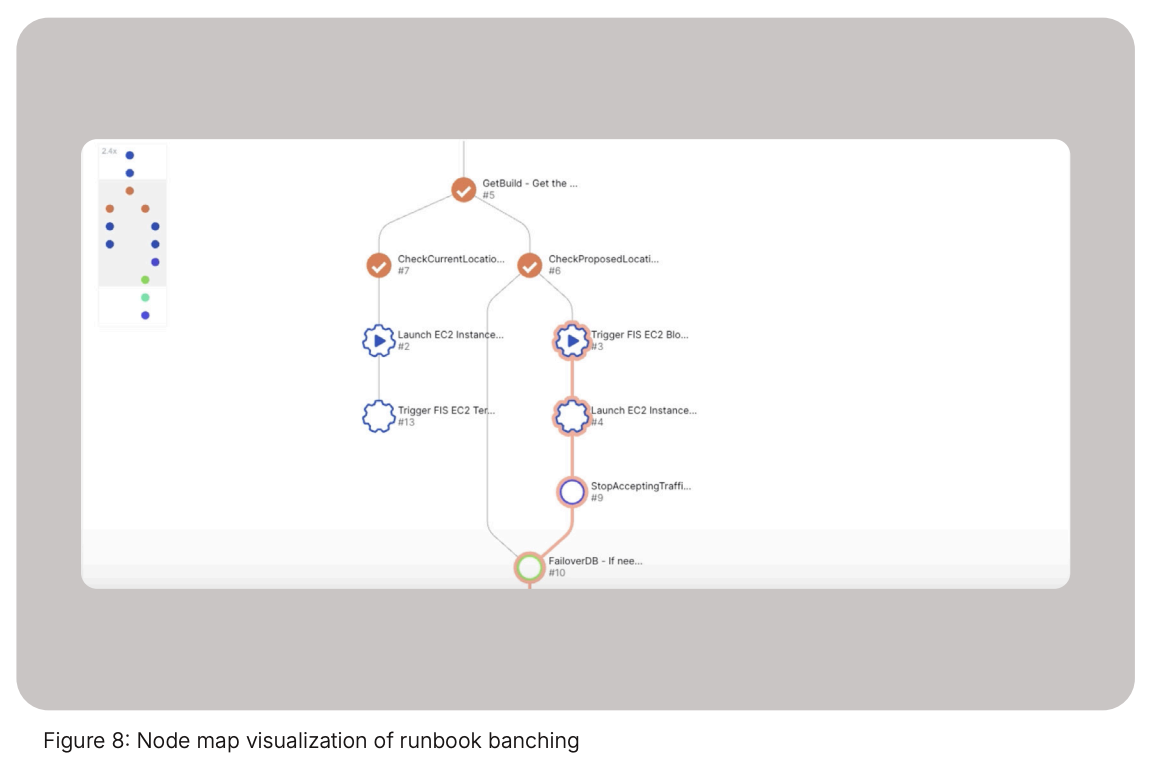
The example below shows how 1) you can create EC2 instances normally, and then 2) an FIS pre-canned template to “disconnect/isolate the secondary AZ” is triggered by Cutover, resulting in there being no compute resources available for the failover. In the third step, you can branch the process in Cutover to find an alternative AZ to handle this failure. Here’s what that would look like in practice:
The AWS Fault Injection Service (figure 6) is set up with templates which will start by failing the compute instances in an AZ as well as block the creation of new compute capacity in an availability zone.
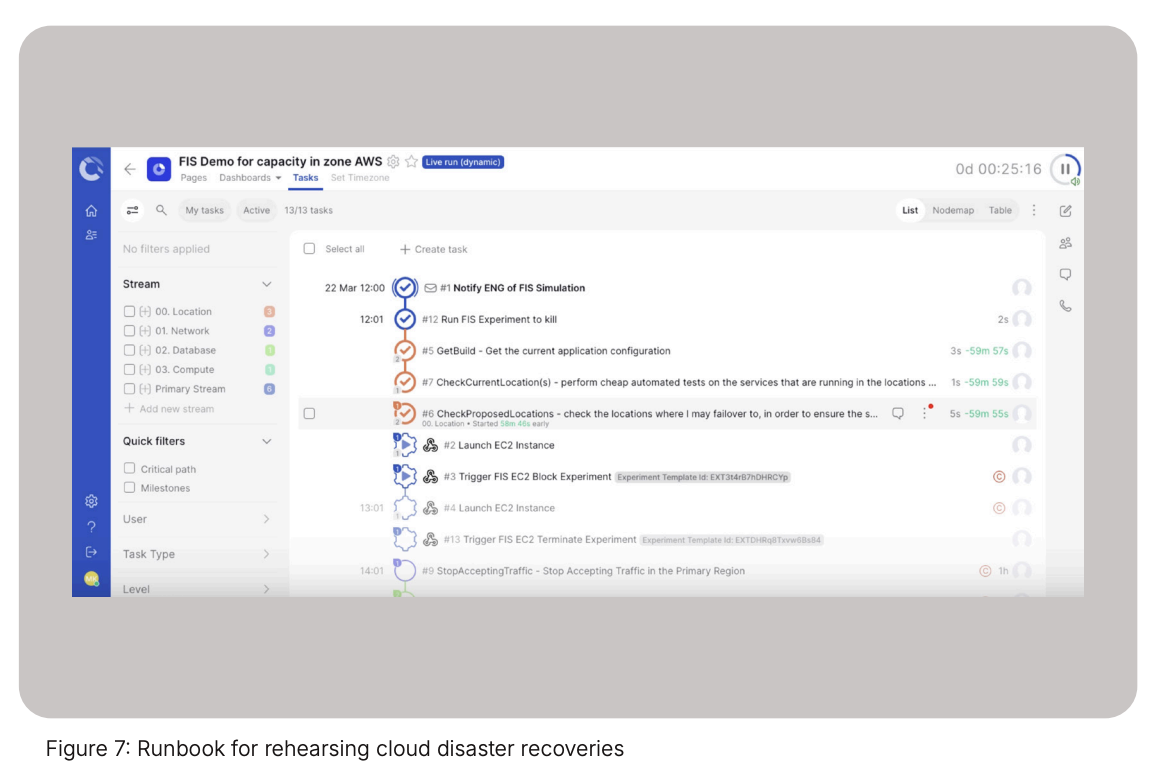
Cutover runbooks (figure 7) allow you a more efficient, standardized and scalable approach on leveraging AWS FIS for cloud disaster recovery testing. Additionally, Cutover provides a single source of execution coupled with an immutable audit trail across multiple AWS accounts.
As the runbook is executed it will successfully launch an EC2. The next step in the cloud disaster recovery test is to initiate the AWS FIS block (figure 8) experiment task to limit the compute capacity by passing and triggering the integration with its template ID.
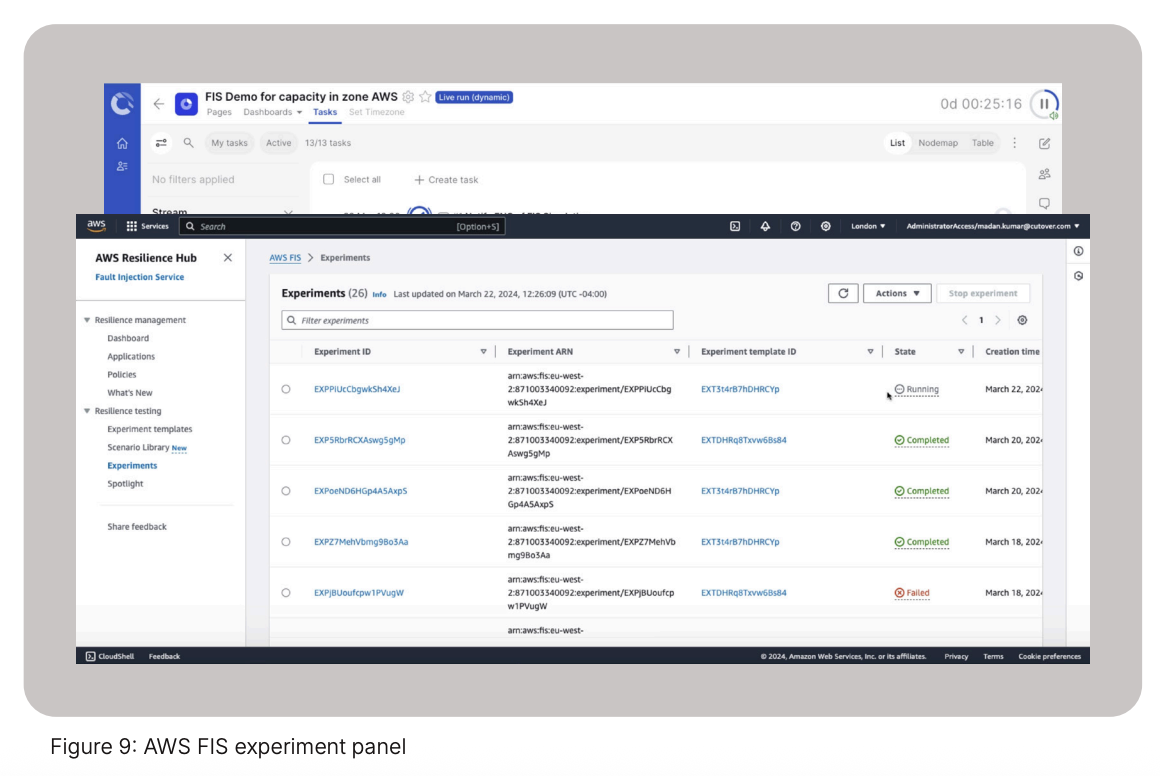
Within the AWS FIS dashboard the failure experiment for insufficient capacity in the availability zone has been created (figure 9). This will cause any “launch another EC2 instance” test recovery scenarios to fail.
As Cutover attempts to launch the new EC2 instance, a response will come back from AWS with a failure and a message indicating that it was due to insufficient capacity limit. This was expected by the FIS experiment.
To complete this test, you can build in tasks to recover the EC2 instance in a secondary availability zone (AZ) and prove to the regulators and your compliance team the ability to recover applications in the cloud.
These are just a few examples of how Cutover, combined with AWS services such as DRS and FIS enable you to test, validate, manage risk and prove stated RTOs of complex application deployments to external regulators and continuously improve your application’s resilience posture.
Six ways Cutover supports your cloud disaster recovery journey
Whether your systems are cloud-native, hybrid or multi-cloud, you need a cloud DR solution that can help you to ensure you can recover from outages and cyber attacks while meeting regulatory compliance requirements. Cloud disaster recovery is a complex process with challenges across your application portfolio that can significantly impact your organization’s operations and bottom line.
Cutover offers a centralized and scalable solution to address your cloud disaster recovery challenges and streamline the overall process. Here’s how Cutover’s cloud disaster recovery software can help:
1. Standardize and scale cloud disaster recovery execution in a single platform Save time with a centralized execution engine for all recovery activities across multiple cloud service providers. Integrate, automate and execute recovery plans across all your cloud workloads, third-party tooling and manual tasks in one central location.
2. Human-in-the-loop capabilities Cutover’s runbooks aren’t entirely hands-off. They can prompt for human intervention at critical junctures, ensuring human oversight and decision-making when necessary.
3. Orchestrate and automate cloud disaster recovery runbooks Reduce the complexity of your cloud disaster recovery by orchestrating both manual and automated tasks with Cutover’s dynamic runbooks. Enable cloud site reliability engineers with a central repository of approved recovery runbooks for increased recovery efficiency and reduced risk.
4. Seamless integration with existing tools Cutover integrates with your existing IT ecosystem, including service management platforms, Infrastructure as Code (IaC), monitoring tools, and communication channels. This eliminates the need for complex workarounds and streamlines your cloud DR workflow.
5. Increase cloud disaster recovery visibility with real-time reporting and dashboards Enable visibility of multi-application recovery progress with real-time dashboards to understand potential problem areas that need attention and keep stakeholders informed of status. Capture and validate RTAs to gain confidence that you can meet RTOs.
6. Prove cloud disaster recovery to regulators Integrate Cutover with fault injection simulators to test a recovery scenario to another cloud region or availability zone. Easily prove the success of the experiment or failover to regulators with Cutover’s auto-generated audit trail.
.webp)
.webp)


